Web Development

Travelco Air - Travel Discovery and Booking Platform

A travel platform connecting destination discovery, holiday and Umrah packages, visa consultancy, corporate inquiries, and customer booking management through a responsive interface and a custom animated flight journey.

Role

Full Stack Developer

Status

Completed
dev.travelcoair.com
Travelco Air - Travel Discovery and Booking Platform
StackAuthentication & AuthorizationLaravelPHPREST APIDatabase DesignMySQLQuery OptimizationRedisCI/CDDockerGitNext JSReactRedux / Redux-ToolkitTailwind CSSTypeScript
01

Project Overview

What the product does, who it serves, and the parts I owned end to end.

Travelco Air brings the travel-planning journey into one customer-facing web experience. Travelers can explore destinations, compare tour packages, understand visa requirements, submit bookings, and return to a personal dashboard to review their travel records. Businesses have a separate path for requesting corporate travel services and tracking inquiries by reference number.

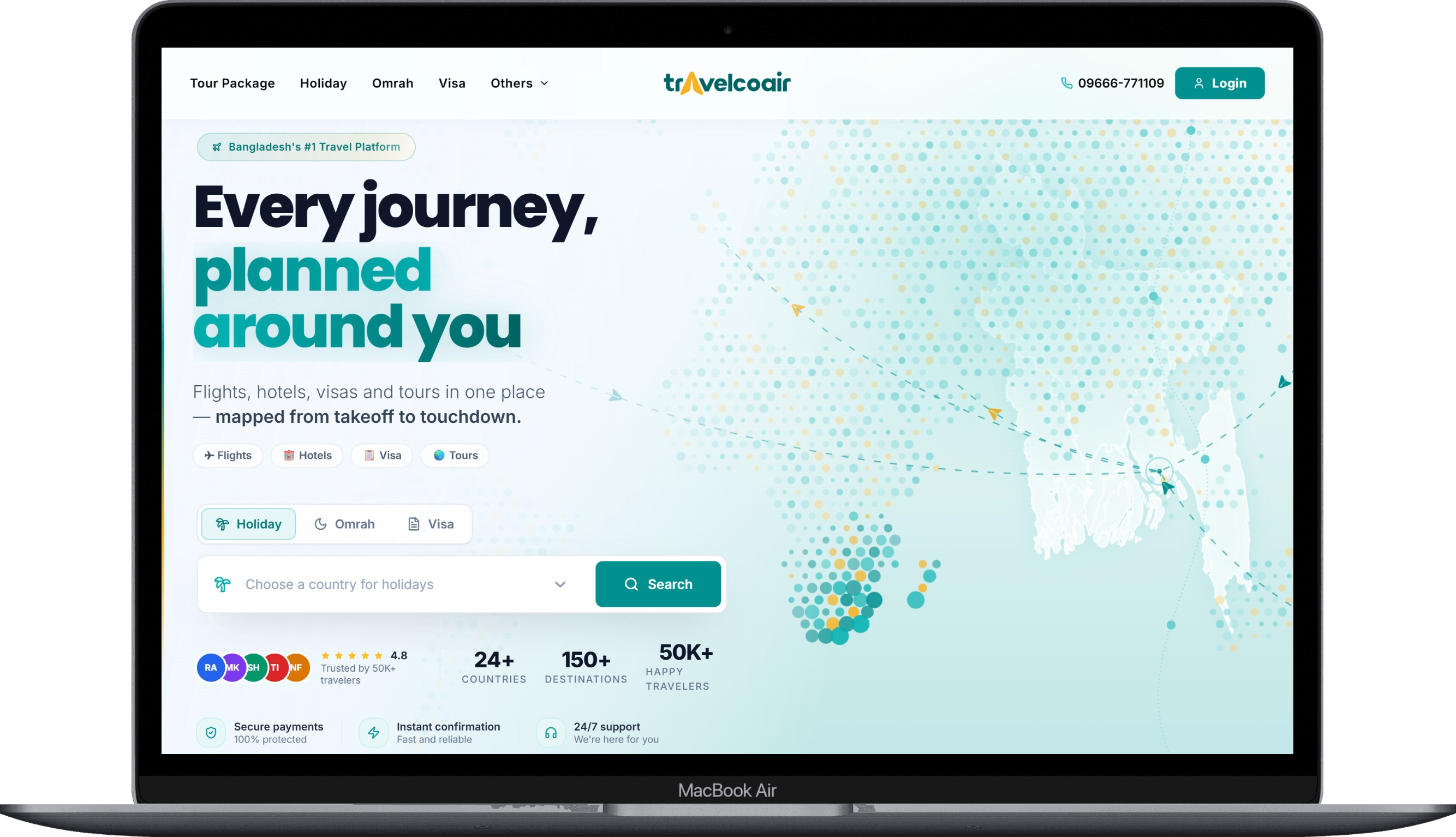
The project combines two distinct frontend needs: an engaging brand experience that inspires exploration, and practical workflows that make complex travel information easier to navigate. The homepage introduces the brand through a scroll-driven flight journey, with a dotted world map that transforms into globe, logo-rocket, and flight-network formations. Destination panels, section transitions, and pointer-responsive effects create continuity between the visual storytelling and the service offerings.

Behind that presentation is an API-connected application with filtered package and visa listings, detailed information pages, validated booking forms, session-aware authentication, and customer account tools. The interface is designed around the full path from discovery to booking submission and follow-up, rather than treating each service as an isolated page.
02

Core Features

The capabilities that define the product surface.

01

Destination-Based Discovery

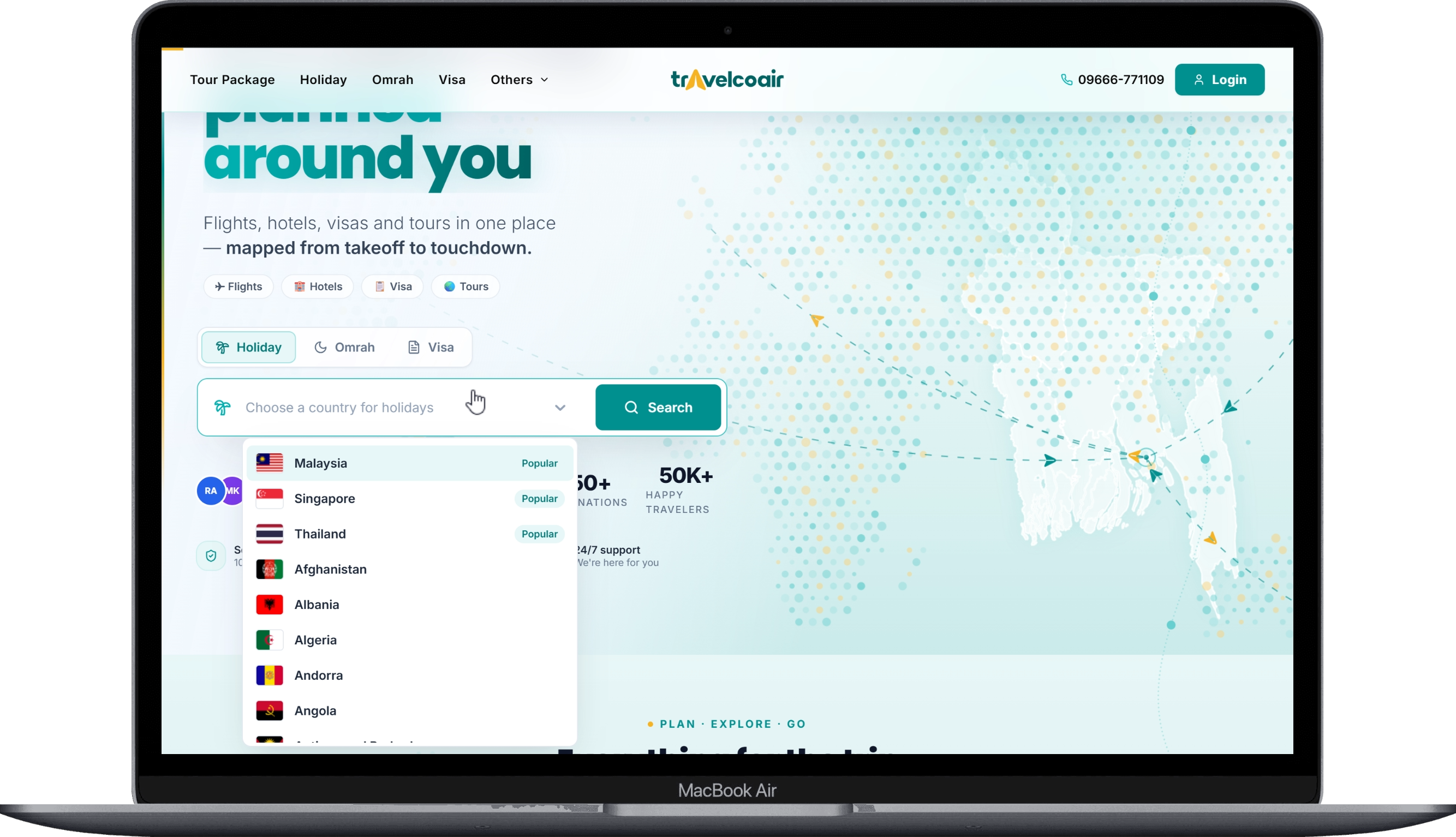
The homepage offers separate Tour Package, Holiday, and Visa search modes. A searchable country selector displays flag images and prioritizes popular destinations. Selecting a country opens the appropriate listing with its destination context already applied.

02

Tour, Holiday, and Umrah Packages

Travelers can browse a general package catalog or dedicated holiday and Umrah pages. The general listing combines keyword search, dynamic suggestions, category selection, price range, duration, difficulty, sorting, and pagination. Category-focused listings reuse a common component with country, price, duration, and group-size controls where applicable.

03

Detailed Package Presentation

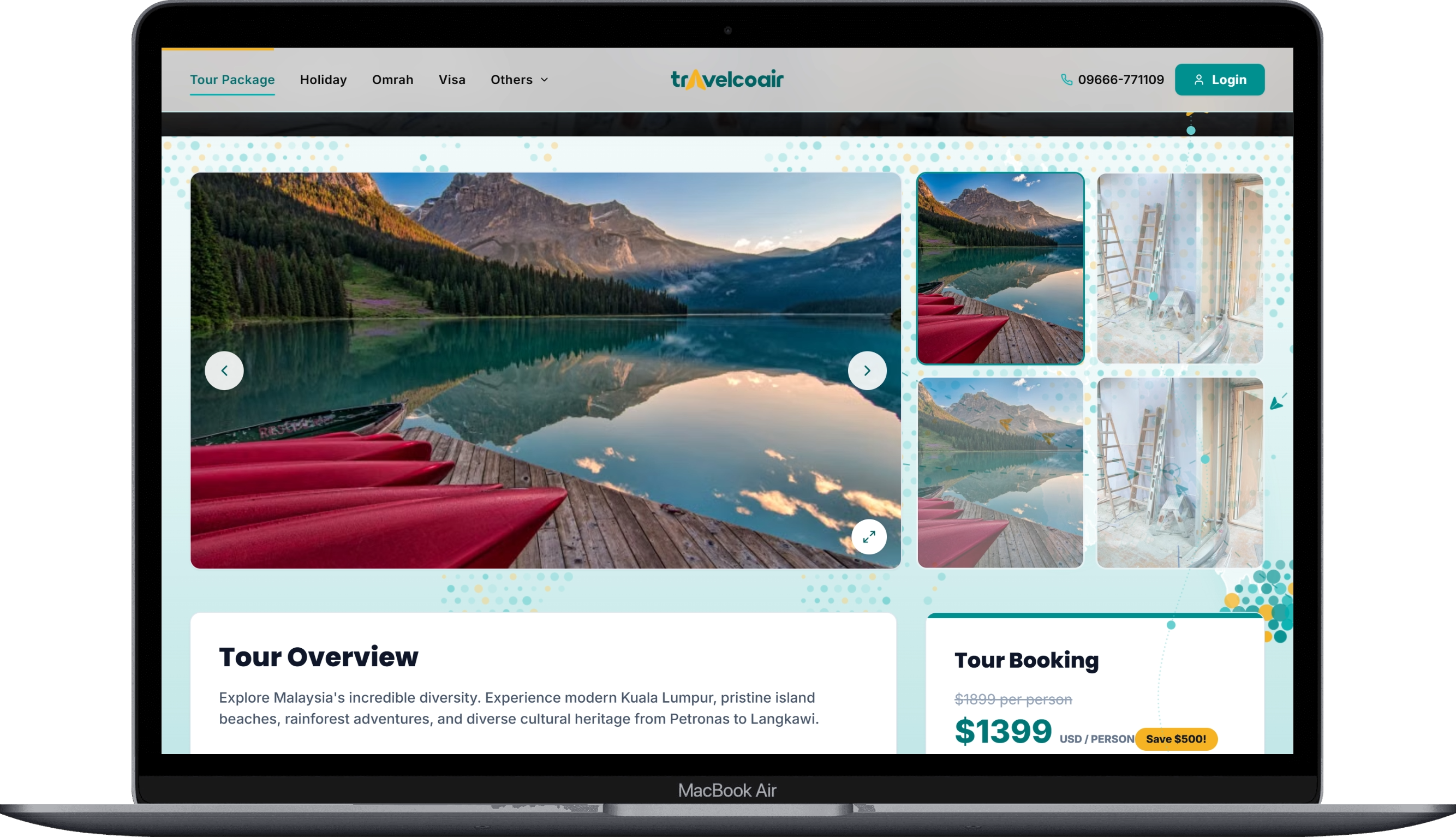
Package pages include image galleries and a lightbox, overview content, highlights, day-by-day itineraries, inclusions and exclusions, FAQs, review presentation, and pricing. A booking entry point prompts unauthenticated visitors to sign in and then continues to the selected package's booking form.

04

Package Booking with Optional Add-ons

Customers can enter a travel date, review prefilled contact information, specify adult/child/infant counts, add special requests, and select available add-ons. A price summary updates with traveler and add-on selections. Successful submission returns the customer to the booking area of the dashboard.

05

Visa Discovery and Consultancy Booking

Visa listings expose country, keyword, visa type, entry type, fee range, processing-time, and sorting controls. Detail pages organize general country information, important notes, requirement sections, applicant-category documents, galleries, and FAQs. The booking form captures customer details, travel date, applicant count, and additional messages or requests.

06

Corporate Travel Inquiries

Businesses can request services using company and representative information, service preferences, destination, travel date, group size, and notes. An inquiry-tracking page accepts a reference number or opens directly from a reference-based route, displaying the returned inquiry details and a status-based progress sequence.

07

Customer Dashboard and Account Tools

The customer area provides an overview with derived travel statistics, upcoming trips, and recent booking/visa activity. Dedicated sections offer searchable booking and visa records, detailed price and applicant information, corporate inquiry history, editable profile information, and an API-connected password-change form.

08

Custom Animated Flight Journey

A persistent dotted map changes formations as the visitor moves between page sections. The experience includes a branded logo-rocket, animated flight routes connected to Dhaka, a scroll-aware guide with waypoints, pointer parallax, and a session-aware intro. Desktop destination panels move horizontally with scroll progress, while small-screen and reduced-motion users receive a native swipeable alternative.

09

Responsive Navigation and Supporting Content

The application includes a shared desktop header, mobile menu, safe-area-aware mobile bottom navigation, footer, breadcrumbs, categorized FAQs, company information, and office/contact details. Layout-matched skeletons are present in major detail and booking views to provide structure while data loads.

03

Architecture

How the system is layered and why those boundaries were drawn.

Routing and Presentation

Next.js App Router defines public service routes, country/slug-based detail pages, ID-based booking pages, inquiry-reference routes, and a customer dashboard. The root layout mounts global navigation and the journey layer once. Navigation stays outside the animated page shell so page transforms do not change the containing block of fixed-position elements.

Application State

The `_redux` directory contains a custom Redux-style implementation built with React Context and `useReducer`; it does not depend on the Redux or Redux Toolkit packages. The root store combines authentication, bookings, visa applications, dashboard, theme, global, and content slices. Custom `useDispatch` and `useSelector` hooks expose state, and thunk-enabled dispatch runs asynchronous action functions.

Backend Integration

Centralized route definitions live in `apiRoutes/index.ts`. Most client API workflows are implemented in `_redux/actions`, using a shared Axios instance. Browser requests use same-origin `/api` paths that Next.js rewrites to the configured backend. The request interceptor attaches an available bearer token, and a 401 response clears persisted authentication data.

Response adapters in `lib/mappers.ts` and domain action files translate backend payloads into presentation models. Public content can fall back to local seed data; this is a presentation fallback, not offline transactional booking support.

User Interaction
    -> Feature UI / Shared Controls
    -> Action Function
    -> Axios + Centralized Endpoint
    -> Next.js API Rewrite -> Separate Backend
    -> Response Adapter -> Domain Reducer
    -> Updated UI

Forms and Booking Data

Authentication, booking, and corporate inquiry forms use React Hook Form with Zod schemas. Booking forms separate package-specific traveler/add-on data from visa-specific applicant data and map values to the backend's expected field names. Customer details are prefilled from restored or cached profile data. The UI price preview is distinct from the authoritative booking total returned by the backend.

Dashboard Composition

Dashboard initialization retrieves booking and visa records using `Promise.allSettled`, allowing one successful response to be processed even when the other request fails. Adapters populate the booking and visa slices, and helper functions derive dashboard statistics, upcoming trips, and recent activity. The activity feed is derived from records rather than a push-notification or audit-log system.

Motion and Canvas Rendering

`JourneyProvider` shares scroll and pointer MotionValues across supported effects. The mounted background uses Canvas 2D: geographic points from `dotted-map` are precomputed into multiple formations, then eased toward the active formation. A section observer selects formations, and the destination section's scroll progress controls logo-rocket travel and direction.

The rendering loop uses a capped cadence, limited pixel ratio, typed-array coordinates, and idle redraw skipping. Pointer effects are gated by pointer capability, and reduced-motion handling simplifies supported animation paths. The active sky layer is CSS-based; the portfolio does not describe unused Three.js components as the current site-wide rendering system.

Theme and Deployment Foundations

Theme configuration supplies primary and accent palettes through CSS custom properties, with versioned local storage for cached theme preferences. Next.js is configured for standalone output. A multi-stage Dockerfile packages dependencies, builds the application, and runs the standalone server; Netlify build configuration is also included. These files demonstrate deployment preparation, not verification of a live production release.

System layers

Frontend

Next JSReactRedux / Redux-ToolkitTailwind CSSTypeScript

Backend

LaravelPHP

Data

MySQLRedis

Infrastructure

CI/CDDockerGit

Tooling

Authentication & AuthorizationREST APIDatabase DesignQuery Optimization
04

Showcase

3 screens from the shipped product. Select any image to expand.